Getting Started
Installation
Clone the repository and install with uv:
git clone <repo-url>
cd mutation_game
uv sync
This installs all runtime dependencies (numpy, networkx, matplotlib).
Basic Usage
Create a game from a Dynkin diagram
The quickest way to get started is with a named Dynkin diagram:
from mutation_game import MutationGame

game = MutationGame.from_dynkin("A3")
Supported types: A1–An, D4–Dn, E6, E7, E8.
Create a game from an adjacency matrix
You can also supply an explicit adjacency matrix:
adj = [
    [0, 1, 0],
    [1, 0, 1],
    [0, 1, 0],
]
game = MutationGame(adj)
Performing mutations
Set an initial population and mutate individual nodes:
game = MutationGame.from_dynkin("A3")
game.set_starting_population([1, 0, 0])

print(game.mutate(0))  # [-1,  0,  0]
print(game.mutate(1))  # [-1, -1,  0]
The mutation game rule at node k is:
Invert the population of the chosen node and add the populations of all its neighbors:
new[k] = -old[k] + sum(neighbors of k)
Mutation as matrix multiplication
This rule is a linear transformation. For each node k, the mutation matrix
M_k is the identity matrix with row k replaced:
Example – A3, mutation at node 1
The A3 graph is 0 — 1 — 2, with adjacency matrix:
Node 1 has neighbors 0 and 2. The mutation matrix M_1 starts as the
identity, then row 1 is replaced with
[adj(1,0), -1, adj(1,2)] = [1, -1, 1]:
Applying it to the vector v = (3, 1, 2):
Node 1’s value changed from 1 to -1 + 3 + 2 = 4, while the other
nodes are unchanged.
Applying mutation k is then simply v' = M_k @ v. You can access these
matrices directly:
>>> game = MutationGame.from_dynkin("A3")
>>> print(game.mutation_matrix(1))
[[ 1  0  0]
 [ 1 -1  1]
 [ 0  0  1]]
Note that each M_k is an involution: M_k @ M_k = I. This means
mutating the same node twice restores the original vector.
Computing the root system
game = MutationGame.from_dynkin("A3")
roots = game.calculate_roots()
print(f"A3 has {len(roots)} roots")  # 12
The method explores all reachable vectors by BFS over every possible mutation
sequence, starting from the simple roots e_i and -e_i. It first checks
that the Cartan matrix is positive definite (see Mathematical Background), ensuring
the root system is finite. For non-finite-type graphs, a RuntimeError is
raised immediately.
Known root counts:
Type |
Total roots |
|---|---|
An |
n(n + 1) |
Dn |
2n(n - 1) |
E6 |
72 |
E7 |
126 |
E8 |
240 |
Finding mutation paths
Given two roots, find_mutation_path returns the shortest sequence of
mutations to transform one into the other:
>>> game = MutationGame.from_dynkin("A3")
>>> path = game.find_mutation_path([1, 0, 0], [1, 1, 1])
>>> for mut_idx, result in path:
...     print(f"  mutate node {mut_idx} -> {list(map(int, result))}")
  mutate node 1 -> [1, 1, 0]
  mutate node 2 -> [1, 1, 1]
Starting from the simple root (1, 0, 0), we reach (1, 1, 1) in two
mutations: first mutate node 1, then node 2.
Each step is a (mutation_index, resulting_vector) pair. The method raises
ValueError if either vector is not a root in the system.
Mutation path table
To see the shortest paths between all pairs of roots at once, use
print_mutation_path_table:
>>> game = MutationGame.from_dynkin("A3")
>>> game.print_mutation_path_table()
Source     Target     Mutations         Len
-------------------------------------------
(0, 0, 1)  (0, 1, 0)  1 -> 2            2
(0, 0, 1)  (0, 1, 1)  1                 1
(0, 0, 1)  (1, 0, 0)  1 -> 2 -> 0 -> 1  4
(0, 0, 1)  (1, 1, 0)  1 -> 2 -> 0       3
(0, 0, 1)  (1, 1, 1)  1 -> 0            2
(0, 1, 0)  (0, 1, 1)  2                 1
(0, 1, 0)  (1, 0, 0)  0 -> 1            2
(0, 1, 0)  (1, 1, 0)  0                 1
(0, 1, 0)  (1, 1, 1)  0 -> 2            2
(0, 1, 1)  (1, 0, 0)  2 -> 0 -> 1       3
(0, 1, 1)  (1, 1, 0)  2 -> 0            2
(0, 1, 1)  (1, 1, 1)  0                 1
(1, 0, 0)  (1, 1, 0)  1                 1
(1, 0, 0)  (1, 1, 1)  1 -> 2            2
(1, 1, 0)  (1, 1, 1)  2                 1
By default only positive roots are included. Pass positive_only=False for
the full table. The programmatic version mutation_path_table() returns a
list of dicts for further processing.
Note
Each mutation is an involution (applying it twice restores the original
vector), so every path is reversible: to go from B back to A, apply the
same mutations in reverse order. For example, if 1 -> 2 -> 0
transforms A into B, then 0 -> 2 -> 1 transforms B back into A. This
is why the table lists each pair only once.
Plotting
Positive roots (default)
By default, plot_root_orbits shows only the positive roots arranged in a
hierarchical layout, with simple roots at the top:
game = MutationGame.from_dynkin("A3")
fig = game.plot_root_orbits()
fig.savefig("a3_positive.png", bbox_inches="tight", dpi=150)
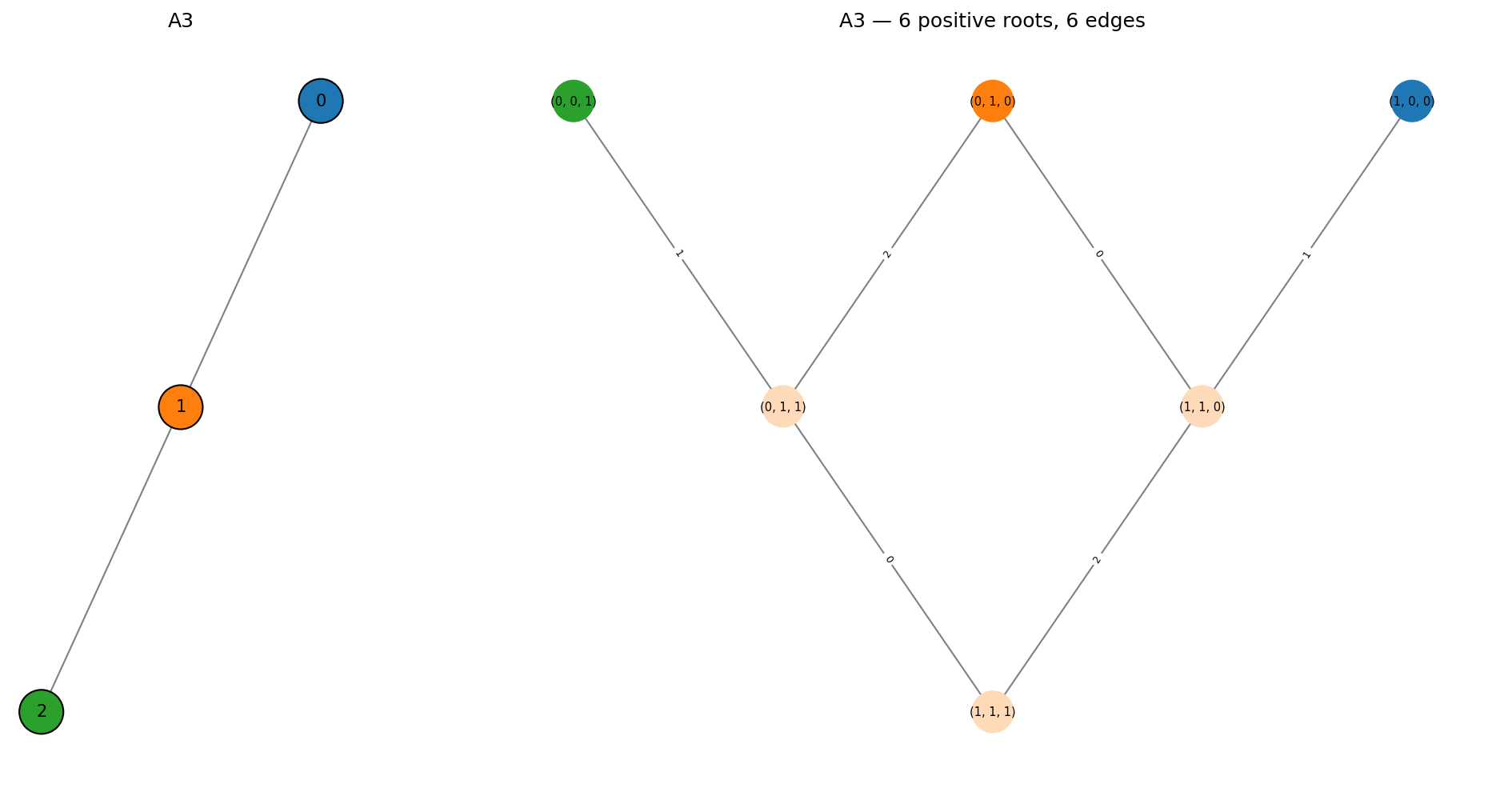
The left panel shows the input Dynkin diagram. Each node has a distinct color that matches the corresponding simple root in the mutation graph on the right. Edges in the mutation graph are labeled with the index of the mutated node.
All roots
Pass positive_only=False to see both positive and negative roots:
fig = game.plot_root_orbits(positive_only=False)
fig.savefig("a3_all.png", bbox_inches="tight", dpi=150)
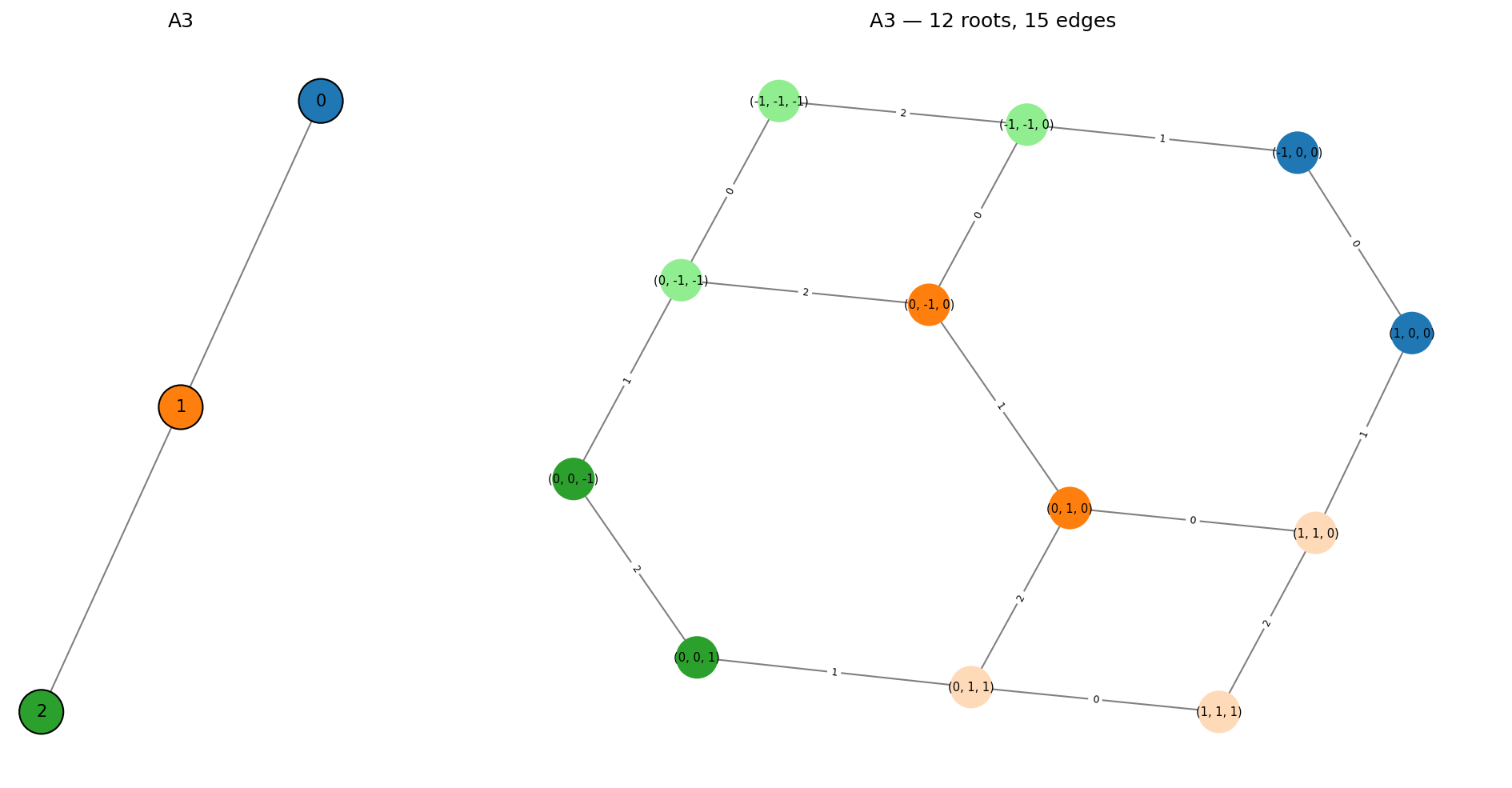
Color scheme:
Distinct color per node – simple roots
+e_iand-e_ishare the color of node i in the Dynkin diagramPeachpuff – non-simple positive roots
Light green – non-simple negative roots
Larger examples
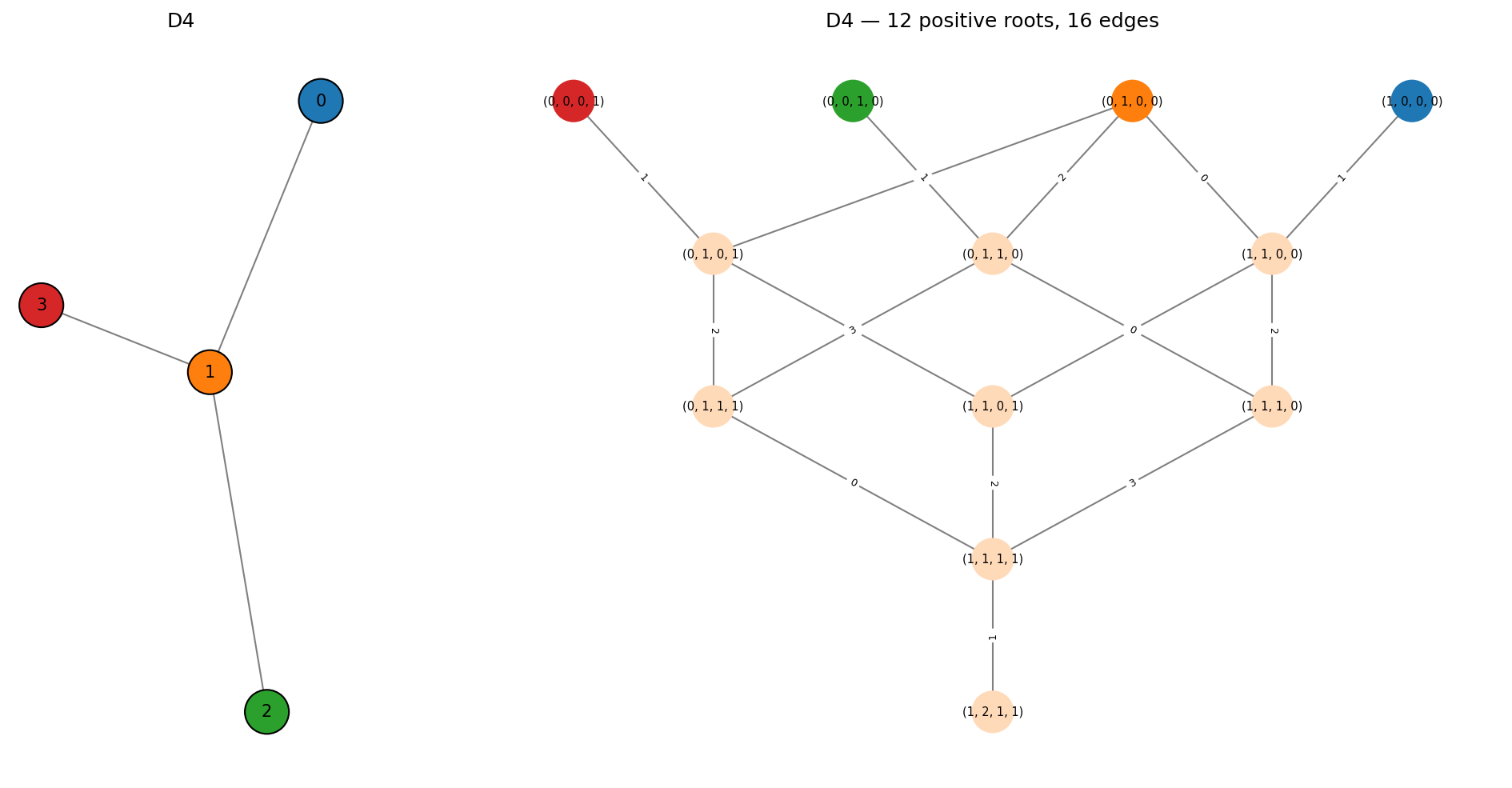
D4:
game = MutationGame.from_dynkin("D4")
fig = game.plot_root_orbits()
fig.savefig("d4_positive.png", bbox_inches="tight", dpi=150)
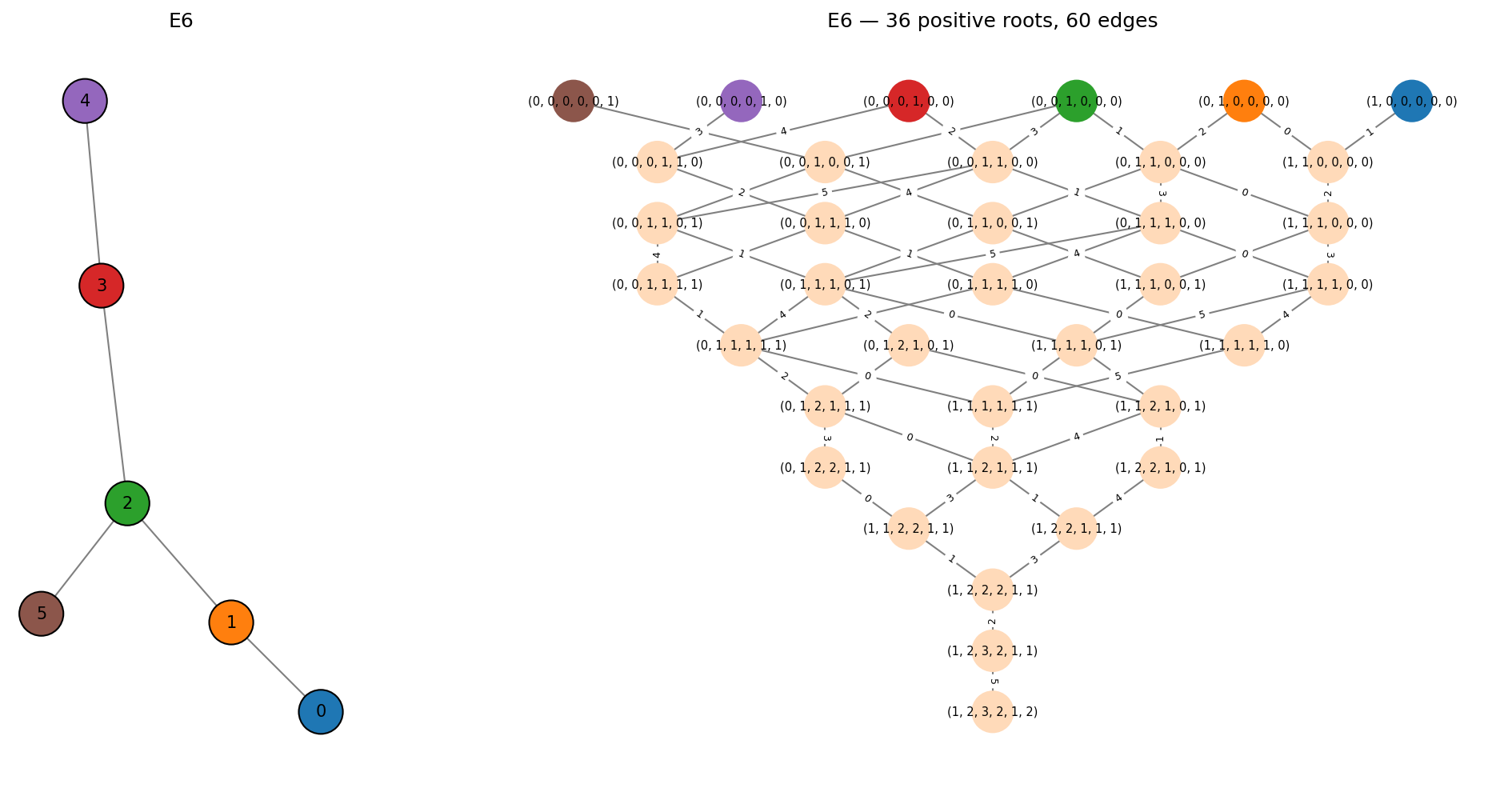
E6:
game = MutationGame.from_dynkin("E6")
fig = game.plot_root_orbits()
fig.savefig("e6_positive.png", bbox_inches="tight", dpi=150)